Troubleshooting
ChatGPT Dots not showing up? Find the cause and fix it
No Your dot entry in ChatGPT? Answer a few questions to find the cause, see exactly where your dot should appear on each device, and try the fixes in order.
Last verified
On this page
You're paying for a plan with Dots, you open ChatGPT, and there's no Your dot anywhere. Your dot is one row in the sidebar, right under New chat. When the row is missing, the cause is the place you're looking, your plan, your region, your workspace, or a rollout that hasn't reached you yet.
#Find your fix
Start here. Answer a few questions about your plan and where you're looking, and each path ends in one thing to do.
#Where your dot should appear
If the tool sent you to look again, this is the spot. In a browser and in the desktop app, Your dot is the second row of the sidebar, and once you've named your dot the row shows its name.

| Where you're looking | Where the row is |
|---|---|
| A browser on a computer, at chatgpt.com | Second row of the sidebar. Sidebar closed? Click the sidebar icon at the top of the window |
| The desktop app | The same row, when the word at the top of the sidebar is ChatGPT. With Codex at the top there's no Your dot row |
| The phone app | First row of the app's menu, by name, above Scheduled. It shows only after you've created your dot on a computer |
| A phone browser | Nowhere. A phone browser doesn't show your dot at all |
#Try these in order
Right place and still no row? Each of these is quick and safe. Stop when Your dot appears.
Switch the desktop app to ChatGPT
Click Codex at the top of the sidebar and choose ChatGPT. The app can reopen in Codex mode, so check this even if your dot was there yesterday. If the app then shows Create your dot, click Continue: it's the same dot.
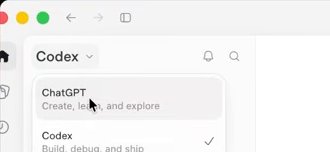
Image: Pat Simmons Go straight to your dot
On a computer, open chatgpt.com/dots. It opens your dot, or the screen that creates it, when your account has access.
Reload, then sign out and back in
Reload the browser tab, or quit the desktop app and open it again. Still nothing? Sign out of ChatGPT and sign back in, so the app loads your account from scratch.
Update the phone app
On a phone, install the latest ChatGPT app from the App Store or Google Play, then sign out and back in.
Check for an incident
If your dot was there and is now gone everywhere, look at status.openai.com. During an incident, wait for it to clear before changing anything.
Give the rollout a few days
Dots reach accounts gradually. If your plan and region are right and you upgraded this week, check once a day.

#If you see a message instead
Sometimes the row or a Create your dot link is there, and clicking it gets you a message. Find yours in the first column.
| The message | What it means | What to do |
|---|---|---|
| "Dots aren’t available in your region yet" | You're on Pro in the EEA, Switzerland or the UK, where Pro has no dot | Use a Business Premium seat. The routes for Europe and the UK |
| The same dialog, outside those regions | Access hasn't reached your account yet | Check once a day for a few days |
| "Dots aren't available on your plan yet" | Your plan has no dot, or access hasn't reached you | Check your plan, then wait a few days |
| "Dots are not available for this workspace" | Dots were switched off for the workspace and the switch is stuck | The workspace owner contacts OpenAI support |
Dots error messages decodes the rest.
#If you're on a Business or Enterprise workspace
At work there's one more gate, and it belongs to your admin: your seat has to include a dot, and the workspace has to have dots switched on.

- Business: you need a Premium seat, and the owner turns on Allow members to use dots under Permissions & roles.
- Enterprise, Edu and Healthcare: an owner enables Use dots (Beta) under Workspace settings, Permissions & roles, Permissions, Workspace default, Workspace capabilities.
- Don't switch dots off and on to test it. Once dots are switched off for a workspace, the switch can refuse to turn back on and show "Dots are not available for this workspace". If that happens, contact OpenAI support.
- FedRAMP workspaces, workspaces with Enterprise Key Management, and workspaces with UAE inference residency can't turn dots on.
Dots for workspace admins has every setting.
#If none of these work
That leaves OpenAI support, at help.openai.com. Put these in your first message so nobody has to ask:
- Your plan, and your seat type if you're on Business
- The country your account is in
- Where you looked: browser, desktop app or phone app
- The exact words of any message you saw, or a screenshot
- The day you upgraded
If your dot exists and only one device is missing it, keep working from a device that shows it. On a phone, Slack reaches your dot without the ChatGPT app.
#Check you've got it
One case where waiting is the wrong fix.
You're on Pro 200 in the UK. You've waited a week and there's still no dot. What happens if you wait another week?
- It arrives. The rollout takes time
- Nothing changes
- It arrives once you update the app
Show the answer
Nothing changes
The rollout delay applies to accounts that are eligible. Pro in the UK, the EEA and Switzerland doesn't include a dot, so there's nothing on its way. A Business Premium seat is the plan that includes one there.
The rollout delay applies to accounts that are eligible. Pro in the UK, the EEA and Switzerland doesn't include a dot, so there's nothing on its way. A Business Premium seat is the plan that includes one there.
Is Pro 100 enough, or do I need Pro 200?
Pro 100 is enough. Every Pro tier includes one dot: Pro 100, Pro 200 and Pro 500.
When are dots coming to Plus?
OpenAI plans to bring dots to more users and hasn't named a plan or a date. Today Free, Go and Plus don't include them.
Is there a separate Dots app to download?
No. A dot lives inside ChatGPT. You create it at chatgpt.com in a desktop browser or in the ChatGPT desktop app for macOS or Windows, then use it there and in the ChatGPT phone app.
Is there an age limit?
Yes. Dots aren't available to anyone under 18, on any plan.
My dot is there but it isn't answering. Is that the same problem?
No. A dot that shows in the sidebar and stays silent may have hit a usage stop. Dots limits shows each stop and what to do.
- Rebuilt around the click-through check and real pictures of where the dot appears.
- First published.
Get the Dots cheat sheet
One page with the essentials, plus new guides as they are published. Free.
You're in. Your cheat sheet is ready. Download the PDF
Sources
13
- OpenAI Help Center: Getting started with your dot (plans, regions, rollout, desktop and mobile) help.openai.com
- OpenAI docs: Meet dots, Access section learn.chatgpt.com
- OpenAI Help Center: Manage dots in ChatGPT workspaces help.openai.com
- OpenAI docs: Local computer access for Work Cloud and dots (workspaces that can't join the beta) learn.chatgpt.com
- ChatGPT pricing page (the Dots row for each plan) chatgpt.com
- OpenAI Help Center: ChatGPT Business overview (seat types and prices) help.openai.com
- OpenAI: Introducing dots openai.com
- OpenAI community forum: OpenAI Support on rollout timing for Business Premium community.openai.com
- Pat Simmons on YouTube: screenshots of the desktop app's sidebar and its mode menu youtube.com
- Futurepedia on YouTube: the phone app's menu youtube.com
- Reddit r/OpenAI: the region dialog reddit.com
- Reddit r/codex: screenshot of the workspace switch reddit.com
- Reddit r/OpenAI: a workspace switch that would not turn back on reddit.com